

 Author:
Avalanche is a powerhouse in the cryptocurrency field, known for targeting and serving retailers, newcomers, institutions, and pretty much everyone interested in the industry and the potential of a decentralized finance world.
It doesn’t matter what category you fall in – from a seasoned veteran to someone who’s just venturing into the field of crypto for the very first time – you need a proper wallet. It should be tailored to your needs and allow you to securely store your AVAX while exploring the Avalanche blockchain and its vast ecosystem of decentralized applications.
The following will guide you through the best Avalanche wallets in 2024. You will get to know each wallet’s features, its pros and cons, and some food for thought.
Metamask
Metamask is arguably the most popular wallet in this list, trusted by millions of crypto users globally. You can install the Metamask browser extension or download the app on your mobile device.
It has pretty much everything you could seek in a wallet: staking, cross-chain swaps (through the Metamask Portfolio Bridge), the ability to connect and interact with DeFi apps, and much more.
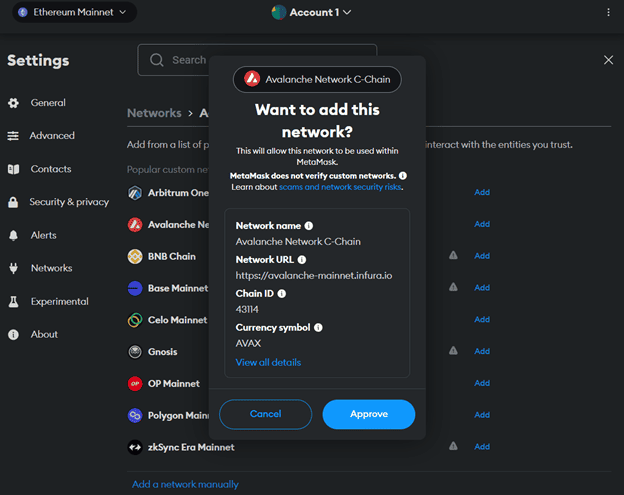
By default, Metamask will have Ethereum as your primary network. You can add Avalanche by clicking on the “Add Network” tab in the network dropdown menu. Next, select Avalanche and add the RPC URL and the Chain ID. The process looks like this:
Pros of Metamask:
- Support for EVM and non-EVM blockchains
- User-friendly interface and quick setup
- Provides a wide variety of resources for developers
- Highly secure wallet with industry-leading standards
Cons of Metamask
- No desktop application
MetaMask key features summary:
- Staking: yes (earn yield using Trust Wallet on dApps)
- Swap: yes
- Interface: mobile, browser extension
- HD wallet integration: yes — Ledger, Trezor AirGap Vault, Keystone (the only one available on Extension and Mobile), and Lattice
- Other chains supported: supports all EVM-compatible blockchains and layer-2 solutions, including Arbitrum, Polygon, Binance Smart Chain, Fantom, Harmony, Avalanche, and Aurora.
Trust Wallet
One of the most popular non-custodial wallets in the market, Trust Wallet offers users complete control over their assets and multiple features in a single interface: staking, swapping, and the ability to browse popular dApps on multiple blockchains and trade NFTs.
It’s available on desktop and mobile, allowing you to check your balance on the go.
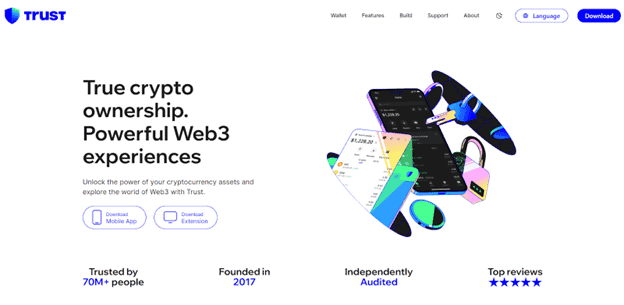
Trust Wallet incorporates a built-in staking feature, allowing you to stake crypto to earn rewards directly in-app. You can stake your assets on the Trust Wallet interface on different dApps.
Moreover, users can integrate Avalanche into Trust Wallet to manage AVAX tokens, with added support for Avalanche NFTs, allowing storage, sending, and receiving of C-Chain NFTs.
To receive Avalanche NFTs within the mobile app, go to Trust Wallet, click “Receive” and then opt for Avalanche C-Chain to generate the wallet receive address. You can check more information regarding NFTs on the C-Chain here.
Pros of Trust Wallet
- An intuitive and easy-to-use interface catering to both beginners and experienced users alike.
- Support for several crypto assets and blockchain networks.
- A built-in staking feature.
- Access to dApps from different blockchains
Cons of Trust Wallet
- Lacks certain security features such as two-factor authentication and multisig functionality.
Trust Wallet key features summary
- Staking: yes (earn yield using Trust Wallet on dApps)
- Swap: yes
- Interface: mobile, desktop, browser extension
- HD wallet integration: yes — Ledger
- Other chains supported: over 70+ blockchains, including Ethereum, Solana, Binance Smart Chain, and more.
Coinomi
Coinomi is privacy and security-centric, making it one of the most secure wallets in the market.
It’s an ideal wallet for users seeking anonymity and simplicity; you’re not required to give personal information during the account setting process, and its intuitive design is suitable for all audiences.
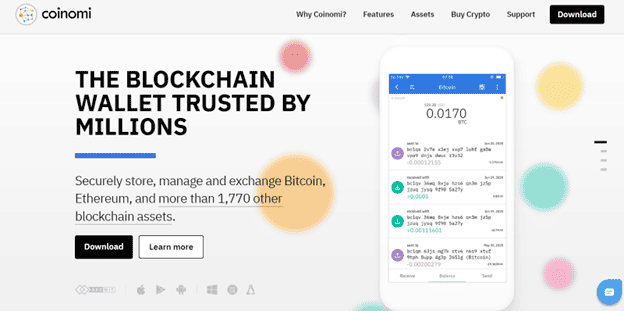
This wallet has a straightforward way of doing things due to its intuitive and simple design, allowing you to efficiently store your AVAX or buy/trade it through the wallet’s DEX section.
Note that Coinomi does not support traditional staking but cold staking (also called offline staking), in which users delegate their assets to other validators to stake for them, but offline. While staking offline can protect assets from cyber attacks, it also means validators have control over your assets. Note that not all cryptocurrencies support cold staking.
Pros of Coinomi
- Supports a large array of cryptocurrencies
- Top-notch security
- Mobile and desktop support
- 24/7 customer support
- Supports NFTs
Cons of Coinomi
- No cold storage integration
- No fiat support
- Not open-source
Coinomi key features summary
- Staking: cold staking
- Swap: Yes
- Interface: desktop and mobile
- HD wallet integration: No
- Other chains supported: Yes, over 125 blockchains, including major networks like Ethereum, Avalanche, Solana, and more
Exodus
Exodus is a user-friendly and non-custodial cryptocurrency wallet available on desktop and mobile. Don’t let its intuitive design fool you — this wallet comes with a lot of features for DeFi enthusiasts, supporting over 150 cryptocurrencies, access to decentralized applications, and the Web3 world overall.
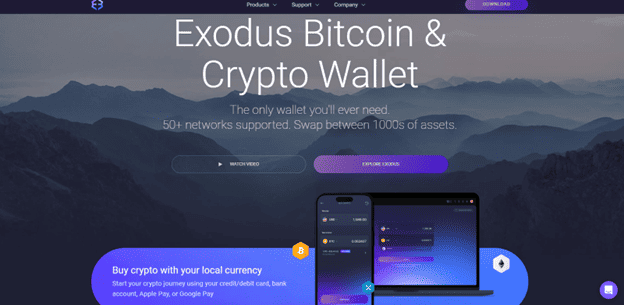
The wallet provides 24/7 customer support, integrates with Trezor hardware for added security, and allows users to stake assets for passive income. It also offers educational resources for beginners who want to learn more about the cryptocurrency world.
Pros of Exodus:
- User-friendly and intuitive design
- Available on desktop (Windows, Mac, Linux) and on mobile (iOS, Android)
- Also accessible as a Web3 wallet
- No KYC required
Cons:
- Fees might be higher than most wallets
Exodus key features summary:
- Staking: yes
- Swap: yes
- Interface: mobile, desktop, browser extension
- HD wallet integration: yes — Trezor
- Other chains supported: Bitcoin, Ethereum, Binance Smart Chain, Polygon, Solana, and Cardano
Coinbase Wallet
Coinbase Wallet is a user-friendly, non-custodial wallet that provides support for Avalanche and its ecosystem of dApps.
You can download Coinbase Wallet on your smartphone or add it as a web browser extension. One additional feature of Coinbase Wallet is its support for NFTs and dApps across various blockchain networks.
Pros of Coinbase Wallet:
- Highly secure wallet
- User-friendly interface with intuitive design
- Provides support for a diverse array of cryptocurrencies
- Seamless integration with the Coinbase ecosystem
- Support for NFTs and DeFi across multiple networks and facilitates user participation in DeFi activities.
Cons of Coinbase Wallet:
- It has one of the highest fees in the market
Coinbase Wallet key features summary:
- Staking: yes
- Swap: yes
- Interface: browser extension and mobile app
- HD wallet integration: the browser extension is compatible with Ledger hardware wallets
- Other chains supported: Yes — Polygon, Avalanche, Ethereum, Solana, Arbitrum, and more
Avalanche Wallet
The Avalanche Wallet is the Avalanche network’s official web-based wallet, offering support for cross-chain transfers, staking, swapping, and storing NFT collectibles. It’s non-custodial and open-source, so you’re responsible for your private keys.
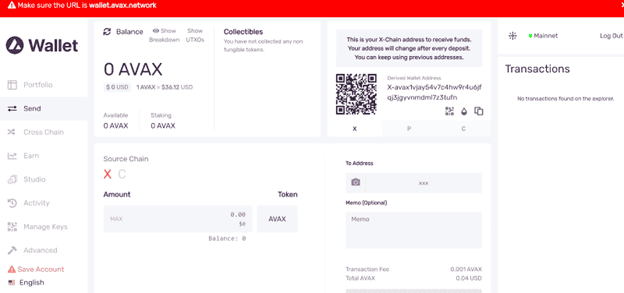
By default, your wallet is configured to display the X Chain address to receive funds, and your address changes after every deposit (you can still use the previous addresses, though).
You can send and receive tokens by simply clicking on the Send tab. You can choose the amount and the source chain (X Chain or C Chain) there. It also supports NFT collections.
To make cross-chain transfers between Avalanche chains, click on Cross Chain and select the Source Chain and the Destination Chain (X, C, or P). The transaction details are on the same page, so it’s a pretty straightforward process.
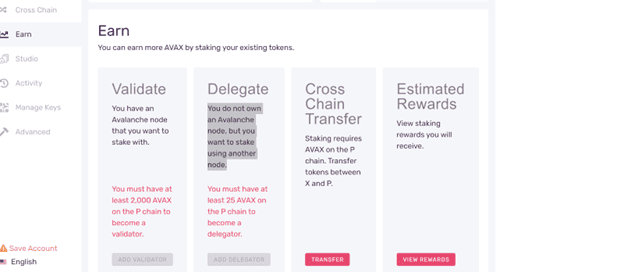
The Earn section is where Avalanche shines the most. You’ll have all the information you need regarding staking tokens and earning more AVAX there. You can also add a validator or stake using another node (delegate).
As a note, you can also store your AVAX using Ledger hardware wallets. You just have to install AVAX through the Ledger Live app.
Pros of Avalanche Wallet:
- User-friendly
- Allows staking, swapping tokens
- Cross-Chain transfer (inter-chain transfers)
Cons of Avalanche Wallet:
- Does not support other chains
- Limited functions
- Doesn’t support other blockchains
Avalanche Wallet key features summary:
- Staking: yes
- Swap: yes (inter-chain)
- Interface: desktop only
- HD wallet integration: yes — Ledger
- Other chains supported: No
Atomic Wallet
Atomic Wallet is a fully decentralized and non-custodial wallet with over 1000 supported cryptocurrencies, including AVAX.
It is available in multiple versions; for desktop, you can install it on Windows, MacOS, and even Linux. You can also download it on Google Play, the App Store, and as an Android APK.
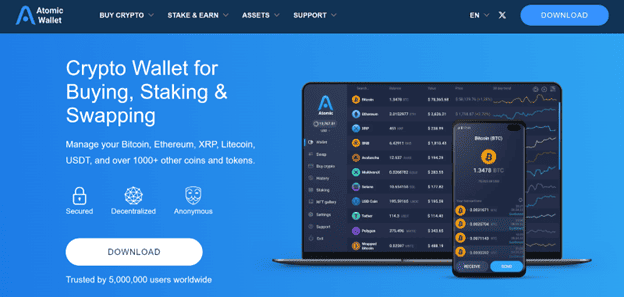
There are a lot of features we can explore on the Atomic Wallet. As you can see, you can buy crypto through the app’s built-in exchange, stake a wide variety of tokens, cross-chain swaps, and much more.
One of the most popular features of Atomic Wallet is its Staking section, which usually rewards users with 5% -20 % APR on certain assets, like ETH, ADA, BNB, SOL, and more. It also offers +1% cashback when you buy specific cryptocurrencies with your bank card. The app accepts USD, EUR, and other fiat currencies worldwide.
Pros of Atomic Wallet
- Supports a wide range of crypto assets.
- User-friendly, simple, and available for desktop and mobile devices
- Allows staking with high APR
- 24/7 customer support
Cons of Atomic Wallet
- No hardware wallet integration: The absence of hardware wallet integration may be a drawback for users seeking additional security layers.
- Hack history: the wallet generated controversy in mid-2023 when it was hacked, affecting over 5,000 users and losing over $100 million.
Atomic Wallet key features summary:
- Staking: yes
- Swap: yes
- Interface: desktop and mobile
- HD wallet integration: No
- Other chains supported: Yes, approximately 20 blockchains, including Ethereum, Avalanche, Solana, and more.
Avalanche Hardware Wallets
Hardware wallets are a crucial component in the cryptocurrency industry, used not only by retail traders and the average crypto enthusiast but also by institutional investors and companies.
Ledger and Trezor are among the best hardware wallets to keep your AVAX safe and offline.
Ledger: Nano S & Nano X
Ledger is a popular option to manage and secure your AVAX. As such, you can choose either the Ledger Nano S or the X version.
These two are both hardware wallets compatible with the Avalanche C-Chain so that you can store, manage, and trade your assets on the Ledger Live app.
Ledger Nano S is more affordable, priced at $80, while the X model can cost $150, but its broader capability is undeniable. At the end of the day, both wallets support AVAX, so it all boils down to your needs.
Trezor: Model T & Safe 3
Trezor is a household name in the cryptocurrency industry. These wallets are known for their extensive focus on security and slick design.
You can store your AVAX on Trezor’s main hardware wallets: Model T and Safe 3. The Trezor Safe 3 is more affordable and includes an upgraded security chip. But the Model T features a touchscreen interface and a more powerful CPU.
Choosing between Trezor Safe 3 and Trezor Model T depends on your needs. Safe 3 is more affordable ($80), intuitive, and suitable for practical purposes. But If you need more features and more crypto assets to choose from, the Model T is a popular option —if you’re willing to pay $180 for it.
On Hardware Wallet Security
While hardware wallets are considered safer than hot wallets, they’re not immune to cyber-attacks. It’s not the physical device but the software these companies run or the third parties they’re associated with.
In January 2024, Trezor said its third-party email provider suffered a security breach, exposing some of their users to malicious actors.
Ledger also has a history of security incidents. In December 2023, a former Ledger employee fell for a phishing attack, allowing the hacker to upload malicious code to Ledger’s NPMJS.
Best Avalanche Wallet for Staking AVAX
Being the official wallet of the Avalanche network, the Avalanche Wallet is arguably the best option for staking AVAX due to its simplicity, low fees, and security, and its staking options make it a user favorite. You can also link the Avalanche Wallet to a Ledger hardware wallet for extra security.
Best Avalanche Wallet for Storing and Trading NFTs
When storing Avalanche NFTs, the Avalanche Wallet again stands out as it offers extensive NFT support and allows users to create, send, and receive their NFTs. It also has a ‘Studio’ tab for creating NFTs and a ‘Portfolio’ section for viewing your NFT collection.
Trust Wallet is another good option for users with C-Chain NFTs, as they can easily store and trade them in their wallets.


